> ## Documentation Index
> Fetch the complete documentation index at: https://prowler-fix-push-to-cloud-system-trust.mintlify.site/llms.txt
> Use this file to discover all available pages before exploring further.
> ## Agent Instructions
> Prowler product naming: Prowler App is now Prowler Local Server, and Prowler Enterprise is now Prowler Private Cloud. Always use the current names when answering. The full product reference is at /getting-started/products: Open Source projects are Prowler CLI, Prowler Local Server, Prowler Local Dashboard, and Prowler SDK; Prowler Products are Prowler Cloud, Prowler Private Cloud, Prowler Hub, Prowler Lighthouse AI, and Prowler MCP.
# Cross-Provider Compliance
> Aggregate a single-provider compliance framework across every provider of the same type, review the consolidated roll-up and per-provider coverage, and download a combined PDF report.
export const SubscriptionBanner = ({children, label = "feature"}) => {
return
This {label} is available exclusively in Prowler Cloud and Prowler Private Cloud with a subscription.
{children}
;
};
export const VersionBadge = ({version}) => {
return
Added in:
{version}
;
};
Cross-Provider Compliance aggregates one **single-provider compliance framework** — CIS AWS, CIS GCP, ENS for Azure — across every provider of that type into a single view. It answers the question a per-scan report cannot: **"How compliant is my whole AWS estate against CIS AWS, together?"**
This view is the sibling of [Cross-Provider Type Compliance](/user-guide/compliance/tutorials/cross-provider-type-compliance), which aggregates a *universal* framework across different provider types. Both live in the **Multiple Scans** tab and share the same roll-up rules, scan selection, and report flow. Only the column axis changes, from provider type to individual provider.
## How Cross-Provider Compliance Works
For a chosen framework and provider type, Prowler Cloud:
1. Selects **one scan per provider**: the latest completed scan of every provider of that type you are allowed to see.
2. Aggregates the requirement results across those scans.
3. Computes a **roll-up status** for each requirement and an overall pass / fail / manual summary.
4. Exposes a **per-provider breakdown** so a failing provider is immediately attributable.
## Accessing the Cross-Provider View
Sign in to Prowler Cloud at [cloud.prowler.com](https://cloud.prowler.com/sign-in) and select **Compliance** from the left navigation.
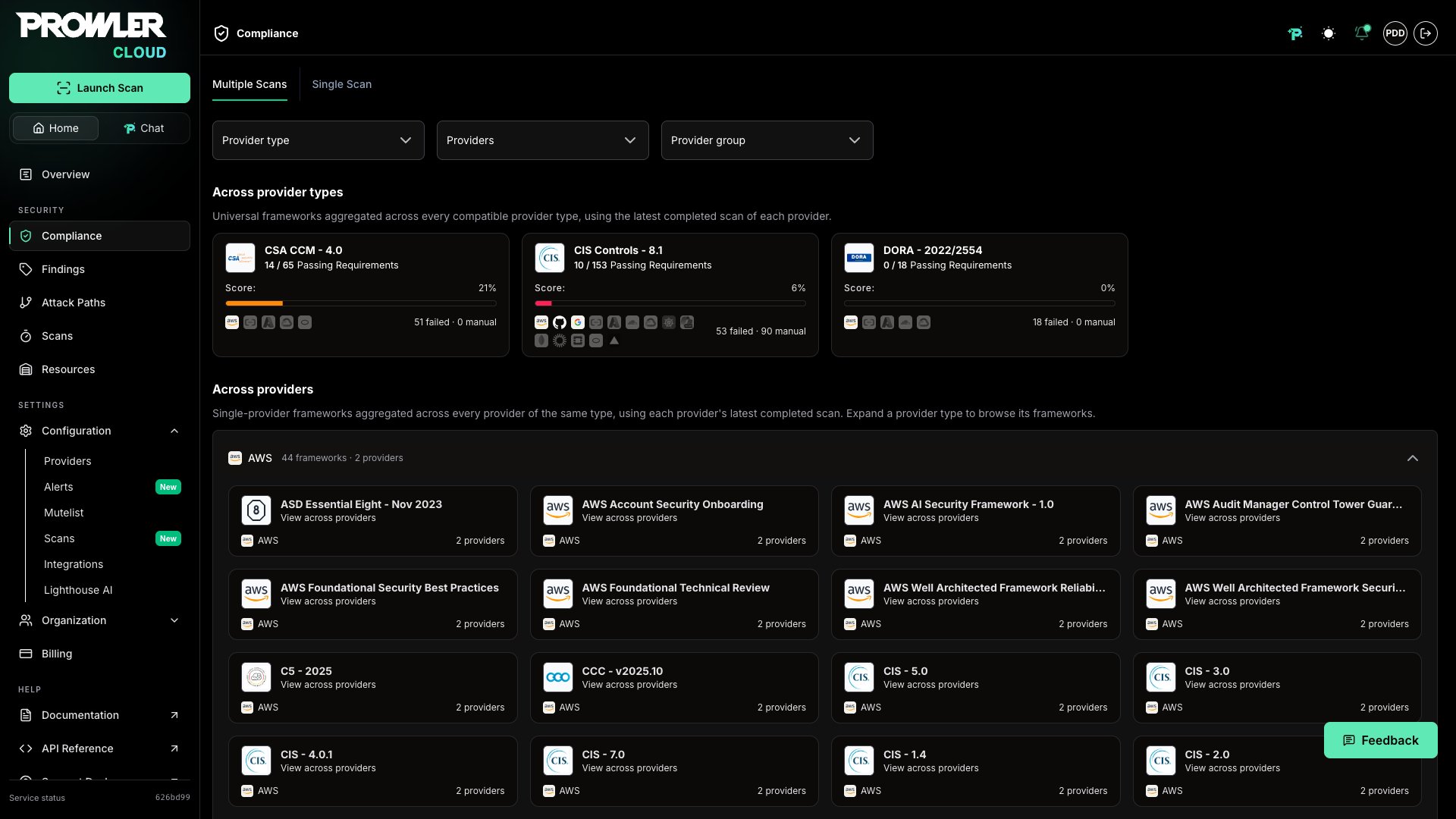
**Multiple Scans** is the landing tab of the Compliance page in Prowler Cloud. Scroll to the **Across providers** section, below the **Across provider types** cards.
Each provider type is a collapsible group headed by its counts (frameworks available and providers registered). Expanding it reveals one card per single-provider framework available for that type.
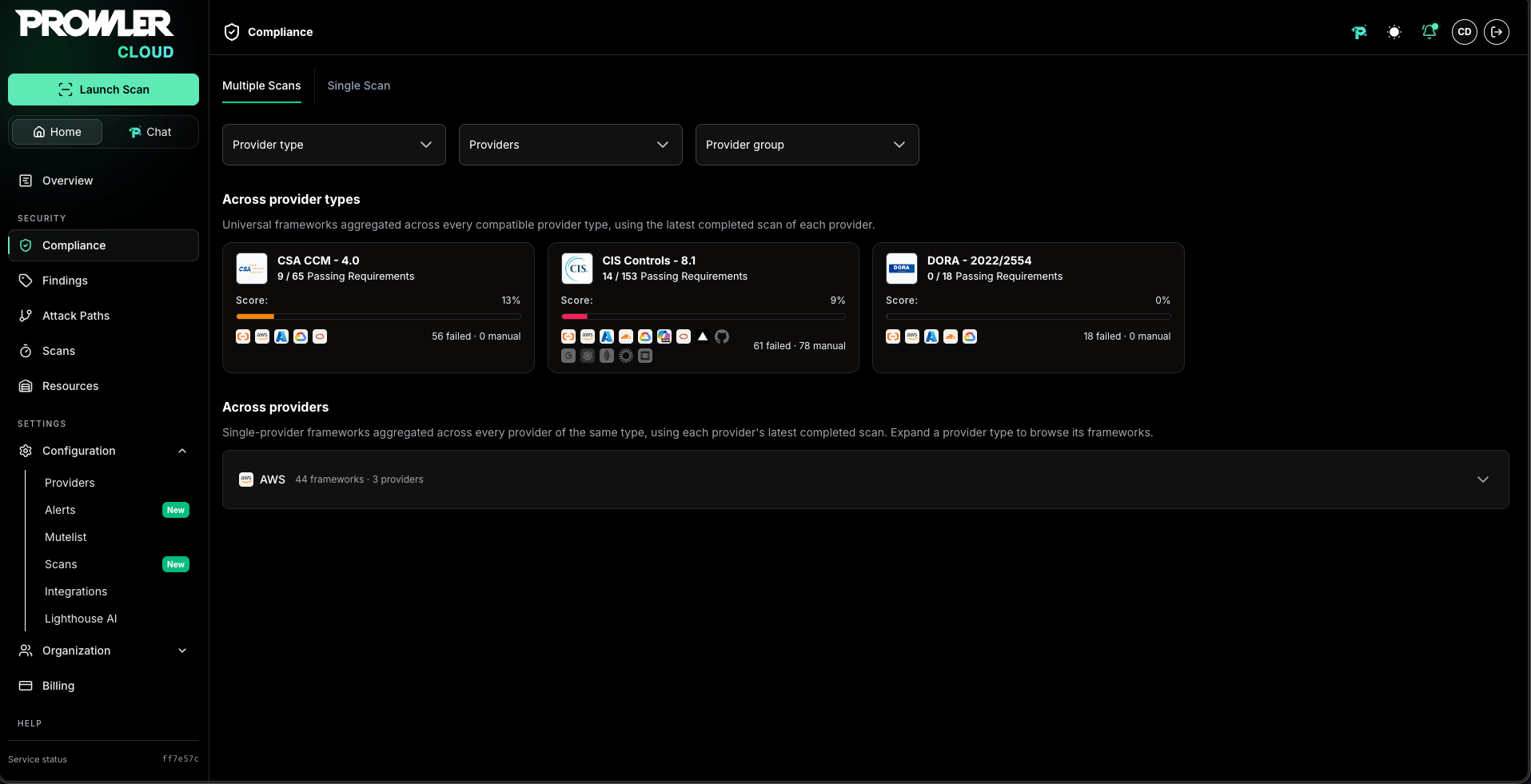 A provider type appears only when it has two or more providers registered **and** at least one of them has a completed scan: that scan is where the framework catalog of the provider type is read from. With a single provider the aggregation is identical to the standard per-scan [Compliance](/user-guide/compliance/tutorials/compliance) view.
Framework cards in this section carry no score: they enumerate which frameworks can be aggregated for a provider type, and the roll-up numbers are computed on the detail page. Two catalogs stay out of the section, because each already has its own view:
* **Universal frameworks:** Aggregated in the **Across provider types** section above. See [Cross-Provider Type Compliance](/user-guide/compliance/tutorials/cross-provider-type-compliance).
* **Prowler ThreatScore:** Reviewed per scan in the **Single Scan** tab. See [Prowler ThreatScore](/user-guide/compliance/tutorials/threatscore).
A provider type appears only when it has two or more providers registered **and** at least one of them has a completed scan: that scan is where the framework catalog of the provider type is read from. With a single provider the aggregation is identical to the standard per-scan [Compliance](/user-guide/compliance/tutorials/compliance) view.
Framework cards in this section carry no score: they enumerate which frameworks can be aggregated for a provider type, and the roll-up numbers are computed on the detail page. Two catalogs stay out of the section, because each already has its own view:
* **Universal frameworks:** Aggregated in the **Across provider types** section above. See [Cross-Provider Type Compliance](/user-guide/compliance/tutorials/cross-provider-type-compliance).
* **Prowler ThreatScore:** Reviewed per scan in the **Single Scan** tab. See [Prowler ThreatScore](/user-guide/compliance/tutorials/threatscore).
 ## Pinning Frameworks to the Watchlist
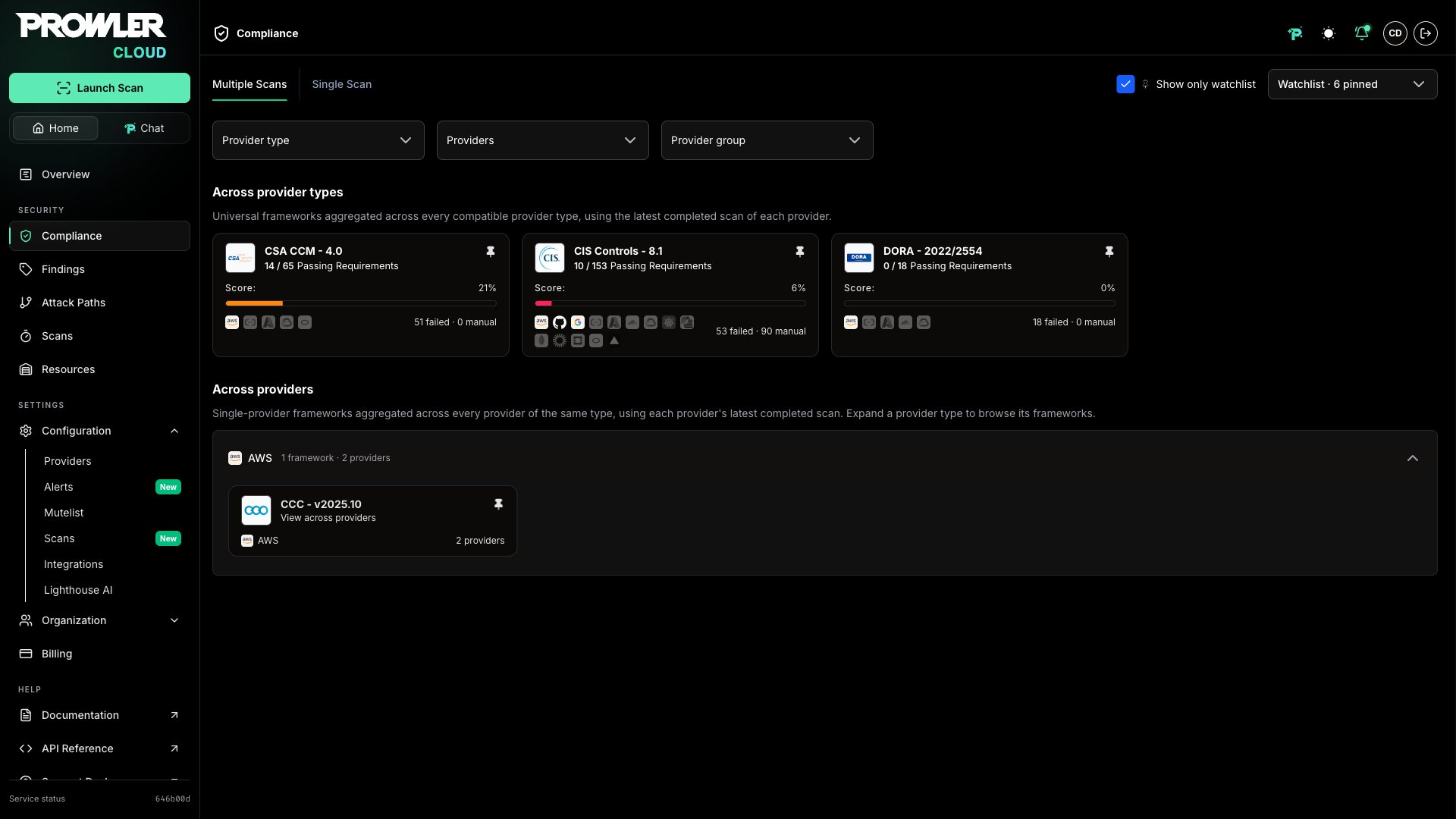
Framework cards inside each provider type group carry a pin button that adds the framework to the organization's [Compliance Watchlist](/user-guide/compliance/tutorials/compliance#tracking-frameworks-with-the-compliance-watchlist). With the **Show only watchlist** toggle enabled, each group lists only its pinned frameworks, and a group whose frameworks are all filtered out explains that no pinned framework matches instead of expanding into an empty accordion.
## Pinning Frameworks to the Watchlist
Framework cards inside each provider type group carry a pin button that adds the framework to the organization's [Compliance Watchlist](/user-guide/compliance/tutorials/compliance#tracking-frameworks-with-the-compliance-watchlist). With the **Show only watchlist** toggle enabled, each group lists only its pinned frameworks, and a group whose frameworks are all filtered out explains that no pinned framework matches instead of expanding into an empty accordion.
 ## Which Providers Are Listed and Which Contribute
The **Across providers** section and the detail page count different things, so their numbers often differ:
* The section describes your **catalog**: the group header and each framework card report how many providers of that type exist in Prowler Cloud, after the filters you applied.
* The detail page describes your **evidence**: only providers with a completed scan become a column in the aggregation, because every number on that page is computed from scan results.
A card can therefore read `17 providers` while its detail page reports two providers aggregated from two scans. The other 15 providers exist in Prowler Cloud but have no completed scan, so there is nothing of theirs to aggregate. This is the expected state right after onboarding an AWS Organization: the discovery wizard registers every member it finds in the organization as a provider, and providers not scanned yet count toward the catalog while contributing nothing to the roll-up. See [AWS Organizations](/user-guide/tutorials/prowler-cloud-aws-organizations) for that onboarding flow.
What decides whether a provider contributes is **having a completed scan**, not its connection status:
* **Completed scans only:** Failed, cancelled, and in-progress scans are ignored, so a provider whose latest scan is still running keeps contributing its previous completed one.
* **Disconnected providers still count:** A provider whose credentials stopped working contributes its last completed scan. The posture it shows is as old as that scan.
* **Newly connected providers do not:** A provider contributes nothing until its first scan completes.
To confirm which providers made it into an aggregation, read the coverage summary in the detail page header and the coverage card, which lists one row per contributing provider.
The **Providers** filter on the detail page lists every provider of the type, including ones that have never been scanned. Narrowing to providers with no completed scan leaves the view with no evidence to aggregate: the coverage card reports nothing scanned, requirements show no per-provider status, and any report generated for that selection is empty. Clear the filter or select providers that have already been scanned.
## Working With the Framework Detail Page
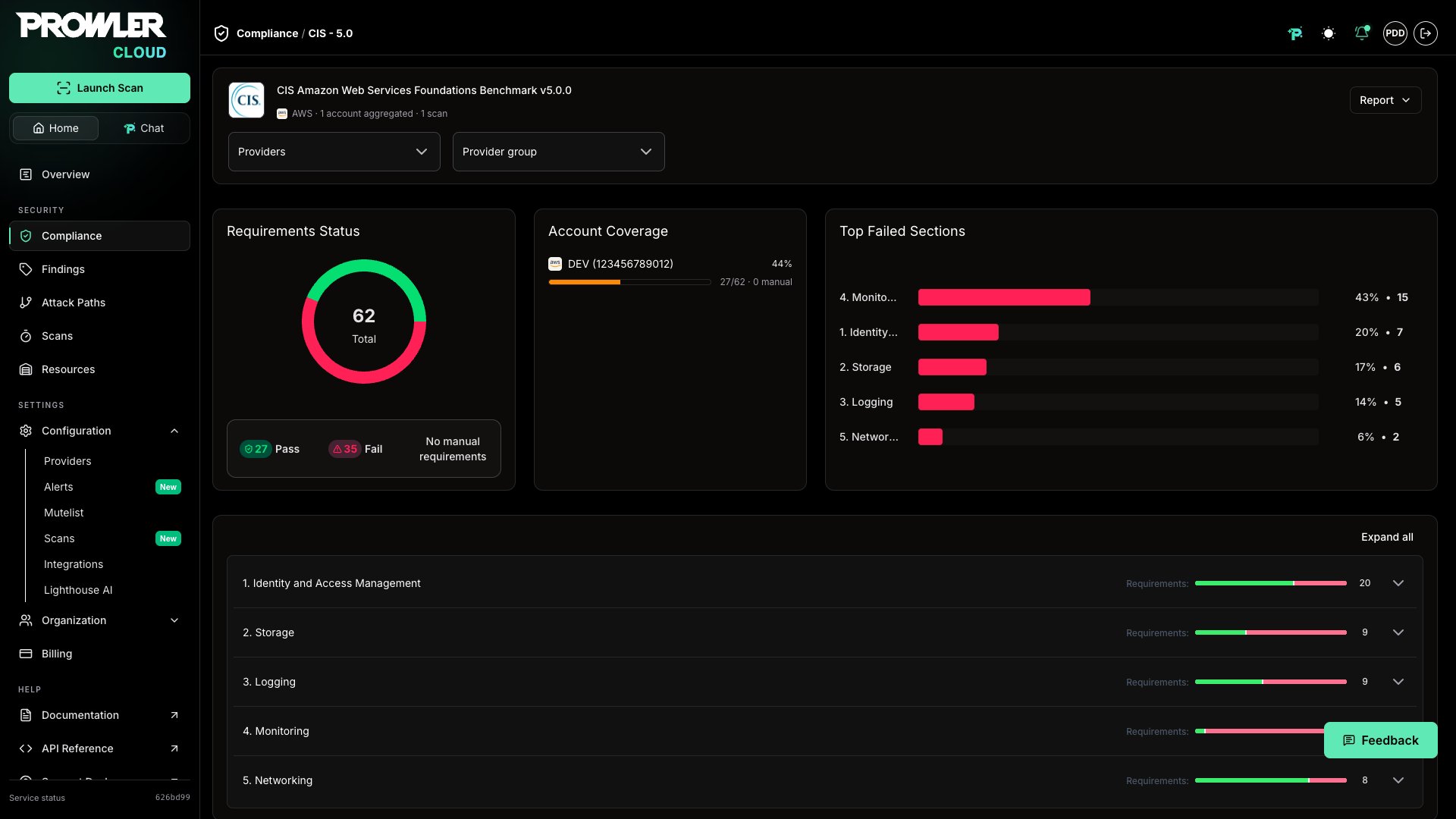
Selecting a card opens a detail page with the same layout as the cross-provider-type detail, with the column axis swapped from provider type to provider:
* **Header:** States the framework, the provider type, and the real coverage behind the numbers, as a count of aggregated providers and scans. The **Report** button generates the combined PDF.
* **Requirements Status:** Donut chart with the consolidated `Pass`, `Fail`, and `Manual` counts.
* **Coverage card:** Ranks each contributing provider's individual posture, so the weakest one is visible at a glance. Every row is one provider of the type, labeled with its alias and unique identifier (UID).
* **Top Failed Sections:** Ranks the framework sections with the most failing requirements, with deep links into the requirements accordion.
* **Requirements accordion:** Each requirement shows its roll-up badge plus the status of every contributing provider, labeled with the provider alias and unique identifier (UID). With one or two providers the statuses appear as inline chips; from three onwards the row condenses into per-status counts (for example, `Fail ×3 Pass ×6`), and selecting the counts opens the full provider-by-provider breakdown. Expanding a requirement queries the findings of every contributing scan and merges them into a single table.
## Which Providers Are Listed and Which Contribute
The **Across providers** section and the detail page count different things, so their numbers often differ:
* The section describes your **catalog**: the group header and each framework card report how many providers of that type exist in Prowler Cloud, after the filters you applied.
* The detail page describes your **evidence**: only providers with a completed scan become a column in the aggregation, because every number on that page is computed from scan results.
A card can therefore read `17 providers` while its detail page reports two providers aggregated from two scans. The other 15 providers exist in Prowler Cloud but have no completed scan, so there is nothing of theirs to aggregate. This is the expected state right after onboarding an AWS Organization: the discovery wizard registers every member it finds in the organization as a provider, and providers not scanned yet count toward the catalog while contributing nothing to the roll-up. See [AWS Organizations](/user-guide/tutorials/prowler-cloud-aws-organizations) for that onboarding flow.
What decides whether a provider contributes is **having a completed scan**, not its connection status:
* **Completed scans only:** Failed, cancelled, and in-progress scans are ignored, so a provider whose latest scan is still running keeps contributing its previous completed one.
* **Disconnected providers still count:** A provider whose credentials stopped working contributes its last completed scan. The posture it shows is as old as that scan.
* **Newly connected providers do not:** A provider contributes nothing until its first scan completes.
To confirm which providers made it into an aggregation, read the coverage summary in the detail page header and the coverage card, which lists one row per contributing provider.
The **Providers** filter on the detail page lists every provider of the type, including ones that have never been scanned. Narrowing to providers with no completed scan leaves the view with no evidence to aggregate: the coverage card reports nothing scanned, requirements show no per-provider status, and any report generated for that selection is empty. Clear the filter or select providers that have already been scanned.
## Working With the Framework Detail Page
Selecting a card opens a detail page with the same layout as the cross-provider-type detail, with the column axis swapped from provider type to provider:
* **Header:** States the framework, the provider type, and the real coverage behind the numbers, as a count of aggregated providers and scans. The **Report** button generates the combined PDF.
* **Requirements Status:** Donut chart with the consolidated `Pass`, `Fail`, and `Manual` counts.
* **Coverage card:** Ranks each contributing provider's individual posture, so the weakest one is visible at a glance. Every row is one provider of the type, labeled with its alias and unique identifier (UID).
* **Top Failed Sections:** Ranks the framework sections with the most failing requirements, with deep links into the requirements accordion.
* **Requirements accordion:** Each requirement shows its roll-up badge plus the status of every contributing provider, labeled with the provider alias and unique identifier (UID). With one or two providers the statuses appear as inline chips; from three onwards the row condenses into per-status counts (for example, `Fail ×3 Pass ×6`), and selecting the counts opens the full provider-by-provider breakdown. Expanding a requirement queries the findings of every contributing scan and merges them into a single table.
 Checks are not labeled per provider type as in the cross-provider-type view. Every provider of the same type shares one check set, so a single list of checks covers the whole aggregation.
### Filtering the Roll-Up
Two filters control which providers feed the aggregation:
* **Providers:** Narrow to specific providers of the type, listed by alias and UID.
* **Provider group:** Narrow to the providers belonging to one or more provider groups.
The provider type is fixed by the framework, so there is no type filter here. Filters applied on the overview carry through into the detail page and the PDF report.
## Understanding the Roll-Up Status
Results roll up in two stages, with a strict **FAIL > PASS > MANUAL** precedence.
**Per provider, per requirement:**
* If any check fails → the provider contributes **FAIL** for that requirement.
* Else if every check passes → **PASS**.
* Otherwise (no pass/fail evidence) → **MANUAL**.
**Across providers, per requirement (the roll-up badge):**
* If at least one contributing provider is **FAIL** → the requirement is **FAIL**.
* Else if at least one contributing provider is **PASS** → **PASS**.
* Otherwise → **MANUAL**.
Only providers that **actually contributed a result** for a requirement are counted. A provider whose scan produced no result for a specific requirement does not degrade that requirement to Manual, which keeps the roll-up focused on real evidence.
Scan selection and permission scoping match the cross-provider-type view: the aggregation always reflects each provider's most recent completed scan, restricted to the providers your role is allowed to see. To review how provider visibility is granted, see [Role-Based Access Control (RBAC)](/user-guide/tutorials/prowler-app-rbac).
## Downloading the Combined PDF Report
The **Report** button produces a single PDF across every contributing provider of the type: a cover page listing the providers, an executive summary with the consolidated roll-up, charts, a requirements index, and detailed findings grouped by requirement and provider.
Checks are not labeled per provider type as in the cross-provider-type view. Every provider of the same type shares one check set, so a single list of checks covers the whole aggregation.
### Filtering the Roll-Up
Two filters control which providers feed the aggregation:
* **Providers:** Narrow to specific providers of the type, listed by alias and UID.
* **Provider group:** Narrow to the providers belonging to one or more provider groups.
The provider type is fixed by the framework, so there is no type filter here. Filters applied on the overview carry through into the detail page and the PDF report.
## Understanding the Roll-Up Status
Results roll up in two stages, with a strict **FAIL > PASS > MANUAL** precedence.
**Per provider, per requirement:**
* If any check fails → the provider contributes **FAIL** for that requirement.
* Else if every check passes → **PASS**.
* Otherwise (no pass/fail evidence) → **MANUAL**.
**Across providers, per requirement (the roll-up badge):**
* If at least one contributing provider is **FAIL** → the requirement is **FAIL**.
* Else if at least one contributing provider is **PASS** → **PASS**.
* Otherwise → **MANUAL**.
Only providers that **actually contributed a result** for a requirement are counted. A provider whose scan produced no result for a specific requirement does not degrade that requirement to Manual, which keeps the roll-up focused on real evidence.
Scan selection and permission scoping match the cross-provider-type view: the aggregation always reflects each provider's most recent completed scan, restricted to the providers your role is allowed to see. To review how provider visibility is granted, see [Role-Based Access Control (RBAC)](/user-guide/tutorials/prowler-app-rbac).
## Downloading the Combined PDF Report
The **Report** button produces a single PDF across every contributing provider of the type: a cover page listing the providers, an executive summary with the consolidated roll-up, charts, a requirements index, and detailed findings grouped by requirement and provider.
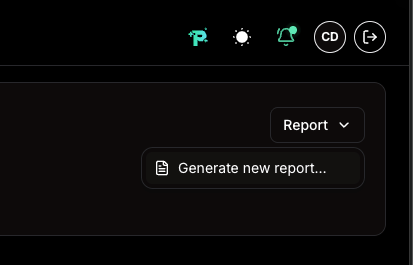 Generation is asynchronous and behaves exactly like the cross-provider-type report — background job, toast notification when ready, and **Report → Download latest** to reuse a report already generated for the current filters. See [Downloading the Combined PDF Report](/user-guide/compliance/tutorials/cross-provider-type-compliance#downloading-the-combined-pdf-report) for the full flow, including report reuse and the findings cap.
A report is tied to the exact set of scans it was built from. When any contributing provider completes a new scan, the previous report no longer matches the current selection and Prowler Cloud offers to generate an up-to-date one.
## Related Documentation
* [Cross-Provider Type Compliance](/user-guide/compliance/tutorials/cross-provider-type-compliance)
* [Compliance](/user-guide/compliance/tutorials/compliance)
* [AWS Organizations](/user-guide/tutorials/prowler-cloud-aws-organizations)
* [Prowler ThreatScore](/user-guide/compliance/tutorials/threatscore)
Generation is asynchronous and behaves exactly like the cross-provider-type report — background job, toast notification when ready, and **Report → Download latest** to reuse a report already generated for the current filters. See [Downloading the Combined PDF Report](/user-guide/compliance/tutorials/cross-provider-type-compliance#downloading-the-combined-pdf-report) for the full flow, including report reuse and the findings cap.
A report is tied to the exact set of scans it was built from. When any contributing provider completes a new scan, the previous report no longer matches the current selection and Prowler Cloud offers to generate an up-to-date one.
## Related Documentation
* [Cross-Provider Type Compliance](/user-guide/compliance/tutorials/cross-provider-type-compliance)
* [Compliance](/user-guide/compliance/tutorials/compliance)
* [AWS Organizations](/user-guide/tutorials/prowler-cloud-aws-organizations)
* [Prowler ThreatScore](/user-guide/compliance/tutorials/threatscore)